Every song gets an Aura.
Auras are live music visualizers, drawn on your iPhone as the song plays. Put one behind the player, or let it take the whole screen.
28 Auras · Prism Glow and Stagelight are free · iPhone and iPad
Unfold the show.
On iPhone Duo, the cover display keeps the song playing. Open it and the player spreads across the inner display — artwork and controls on one side, the lyrics in sync on the other, the Aura behind them both.
Screens are real Prismatic Music captures.
How Auras work.
- Driven by the real audio
- Beats, bass, energy and every frequency band are read from the track as it plays. Two songs never draw the same show.
- Your album's colors
- Turn on Match Album Colors and an Aura wears the palette of the cover that's playing, so each record gets its own light.
- Your Auras
- Heart the Auras you love. Favorites appear in the player's Aura picker and first in the Auras tab.
- Conductor, on iOS 27
- With Prismatic Pro, supported Auras read the whole song first — its sections, beats and drops — and build toward each change before it lands.
- Kind to your battery
- Auras render on the GPU and stop when the app is in the background. Auto-Pause rests them in Low Power Mode or when your iPhone runs hot; the music keeps playing.
- Fully offline
- Everything happens on your device, on your files. Airplane mode, a basement, a long flight — the show goes on.
Every Aura.
28 Auras in four looks. Prism Glow and Stagelight are free; Prismatic Pro unlocks the rest. Hover or tap any one to see it move.
Liquid
Flowing, fluid Auras.
Prism Glow
FreeAlbum colors drift through liquid light.
Stillwater
Every sound sends a ripple through the dark.
Chroma Wave
Ribbons of color ride the current.
Pearl
Liquid pearl catches every pulse.
Navier
Two liquid currents braid and unfold.
Movements
A new fluid world for every section.
Prism Flow
A flowing field, shaped by the whole song.
Light
Beams, glows and light shows.
Alpenglow
First light over a sea of clouds.
Ember Drift
Glowing embers rise with the energy.
Prism Silk
Your waveform, woven into translucent silk.
Stagelight
FreeBeams sweep. Bass widens the stage.
Encore
A sea of lights, swaying with the beat.
Filament
A strand of light for every frequency.
String Theory
Mirrored ribbons breathe with the music.
Sunstroke
A setting sun over molten, glittering water.
Neon Coast
A neon skyline rising over the water.
Cosmic
Stars, galaxies and creatures of light.
Night Bloom
A breathing nebula and shooting stars.
Prism Constellation
Every chord draws a constellation.
Astra
A galaxy that gathers to the music.
Murmuration
A living flock that follows the song.
Whiplash
A creature of light that lives in the sound.
Geometry
Rings, bars and patterns.
Prismatic Mandala
Seven rings. Every layer of the music.
Passage
A neon tunnel you fly through, lit by the music.
Sandsong
Sand on a singing plate, struck by every beat.
Cymatica
Sand patterns drawn by the harmony.
Phosphor
An analog beam with a luminous afterglow.
Spectra
The classic spectrum, drawn in light.
Halo
A crown of frequencies around the bass.
The visualizer, brought back.
Music players used to come with visualizers — WinAmp and iTunes made them iconic, then streaming apps quietly dropped them. Prismatic Music brings them back as Auras, built on the same visual engine as Prismatic FM, our live-radio app.
An Aura isn't a video. While a track plays, the audio is analyzed on your device — the beat, the bass, the energy, each frequency band — and that analysis drives a GPU scene frame by frame. A kick drum hits and the Aura answers; the song builds and the Aura builds with it.
Because Prismatic Music plays files you own, Auras work across your whole collection — the FLAC rips, the Bandcamp purchases, the demos nobody else has — with no streaming service, account, or internet connection.
Turn on an Aura
Auras are built into the player — there's no separate mode to set up.
- 1
Play a song
Start any song in your library and open the full player.
- 2
Tap the Aura button
Tap the Aura button in the player and choose an Aura. It starts moving behind the artwork right away.
- 3
Go full screen
Open the Auras tab to browse by look — Liquid, Light, Cosmic, Geometry — and play any Aura full screen with the song you're listening to.
Guides and next steps
- Turn on a music visualizer on iPhone
Choose a scene and switch between full-screen visuals and the player background.
- Watch Conductor anticipate the song
See the demos and requirements for visuals that read ahead. Requires iOS 27 and Prismatic Pro.
- Compare music players with visualizers
Explore the difference between live music-reactive visuals and decorative animations.
Auras — FAQ
Aura is Prismatic Music's name for a live music visualizer. Each Aura is a GPU scene that reacts to the song that's playing — its beats, bass, energy and frequencies. You can run one behind the player or full screen.
They react to the actual music. Prismatic Music analyzes the playing track in real time and that analysis drives the Aura frame by frame, so two different songs produce two visibly different shows. On iOS 27, Conductor goes further and reads the whole song ahead of time.
Two Auras are free: Prism Glow and Stagelight, behind the player or full screen. Prismatic Pro unlocks every other Aura. Conductor additionally requires iOS / iPadOS 27 and supported local songs. Playback, playlists, and search do not require Pro.
No — streaming apps don't share their audio with other apps, so third-party "Spotify visualizers" either guess from metadata or need workarounds. Prismatic Music plays files you own, which is what lets an Aura read the real audio signal.
Drawing visuals uses more power than a still screen, so Auras render on the GPU and stop when the app is in the background. With Auto-Pause on, they also rest in Low Power Mode or when your device runs hot. The music keeps playing either way.
More of Prismatic Music
All features →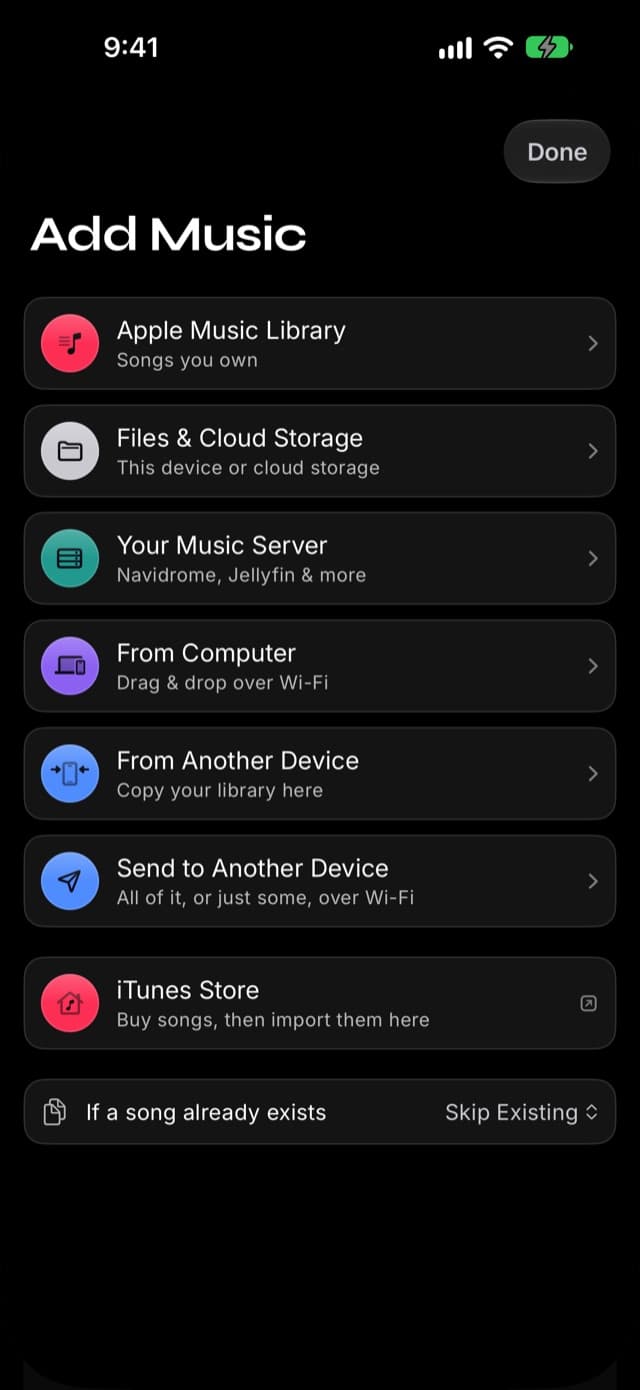
Import
Bring in music from your Apple Music library, the Files app, your computer over Wi-Fi, a music server you run, or your old phone — your collection, one player.
FLAC & Lossless
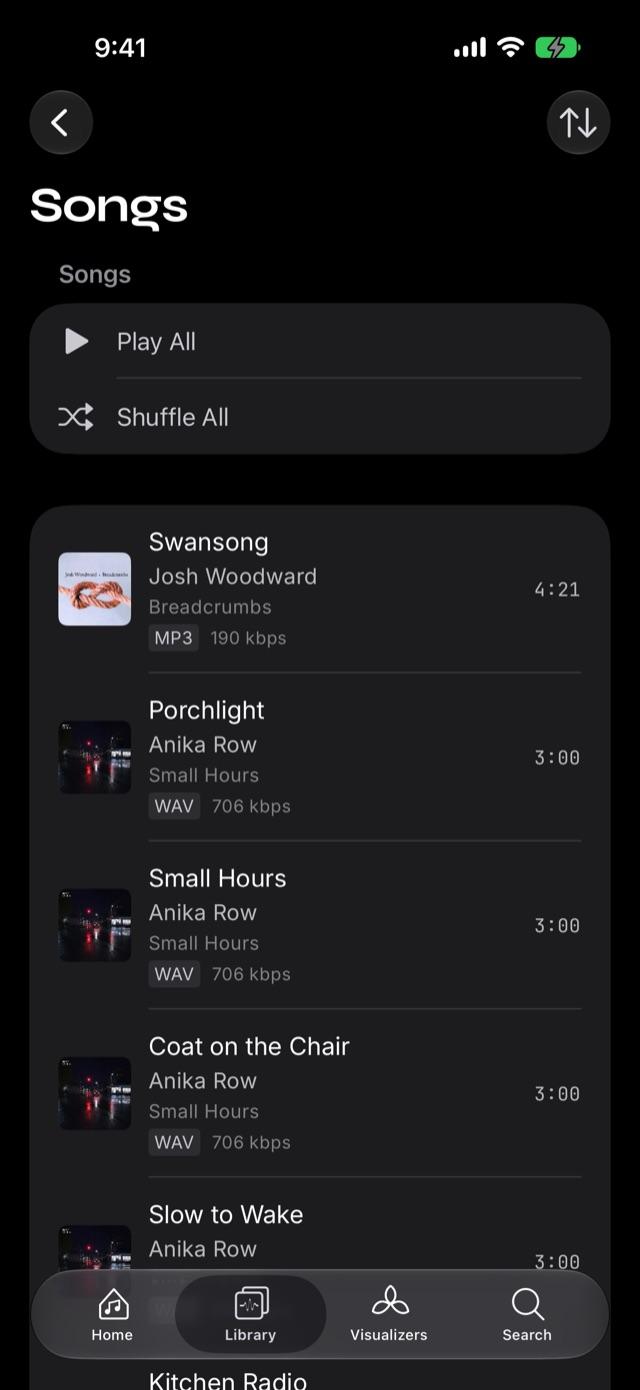
Plays FLAC, ALAC, WAV, AIFF, MP3, and AAC natively — the lossless formats Apple's Music app won't touch.
Equalizer
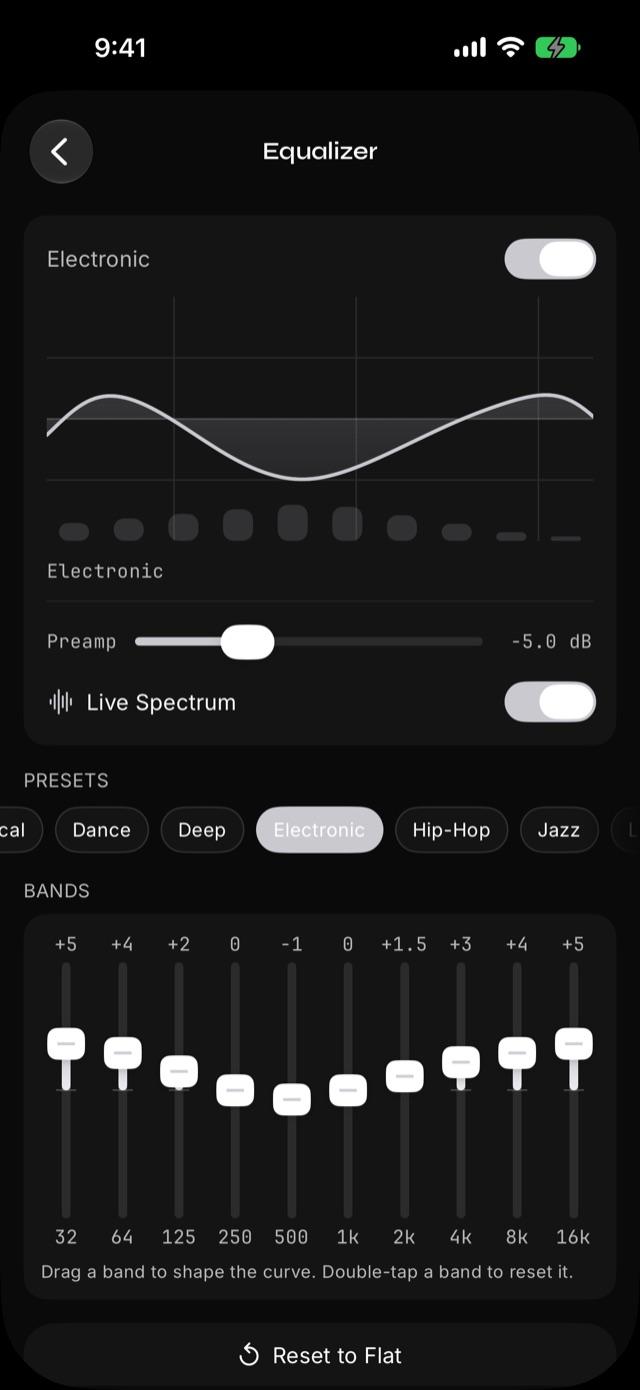
A 10-band graphic EQ with 22 presets — from Bass Booster to Spoken Word — so every track sounds the way you want.
Give every song an Aura.
Prismatic Music is a free offline player for iPhone and iPad. Two Auras are free; Prismatic Pro unlocks them all.