Music Player With an Equalizer for iPhone: Find Your Sound
Want more bass or clearer vocals? Choose a free EQ preset in Prismatic Music. Follow the iPhone screenshot guide and find a sound that suits your headphones.
Want more bass, clearer vocals, or less sharpness from your headphones? A music player with an equalizer lets you change the balance of the sound while you listen. You don't need to understand all the sliders to get started.
Prismatic Music includes 22 free EQ presets for the songs you own, from MP3 downloads to FLAC albums. Choose one, listen, and keep the sound you like. We're the team behind Prismatic; this guide shows exactly where to tap and when another app's EQ might be enough.
Find Your Sound With Prismatic
Download free on iPhone and iPad. Import your songs, listen offline, and try all 22 equalizer presets. No account needed.
Try an equalizer preset in three steps
Start with a song you know well and your usual headphones. If your music isn't in Prismatic yet, follow our guide to importing MP3 files on iPhone. The same file-import flow works for FLAC and other supported music formats.
Step 1: Open Equalizer in Prismatic Settings
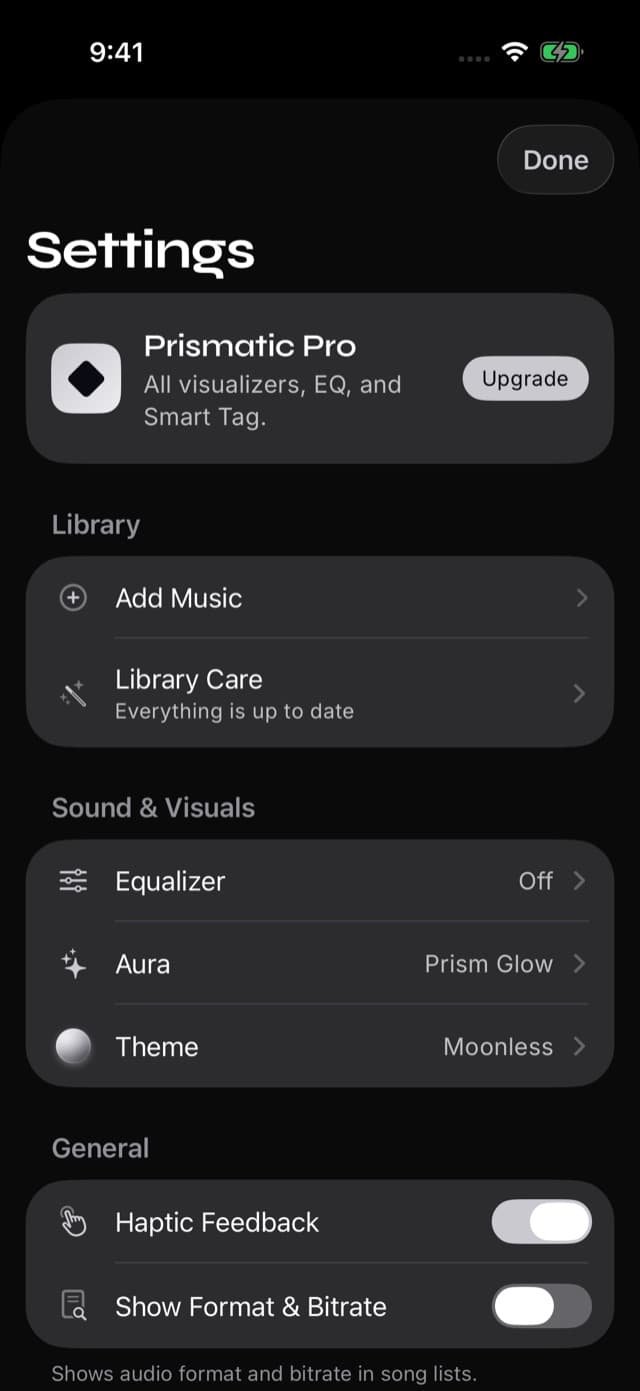
With a song playing, go to Home and open Settings. Under Sound & Visuals, tap Equalizer.
Step 2: Switch the equalizer on
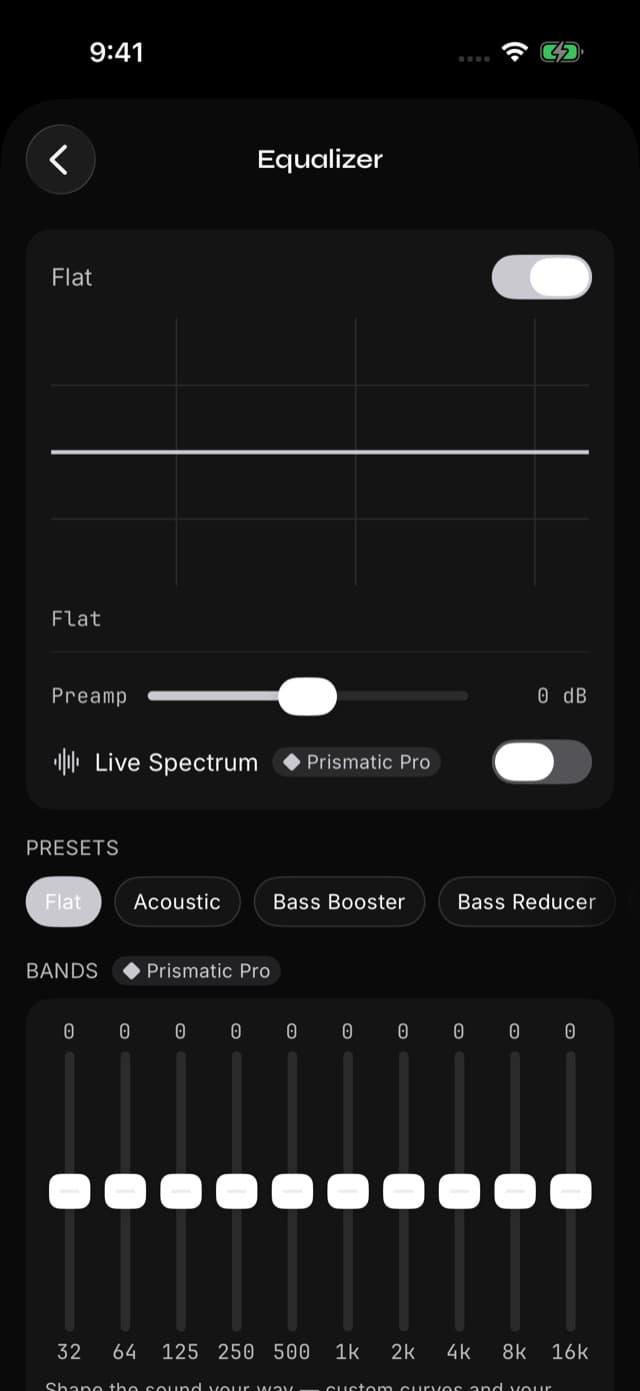
Turn on the switch at the top of the screen. Flat is a starting point that leaves the bands unchanged. You can ignore the sliders and the Live Spectrum option for now.
Step 3: Choose a preset and listen
Tap Bass Booster in the Presets row. Want something else? Swipe that row to explore the other choices. You can hear changes while your song plays.
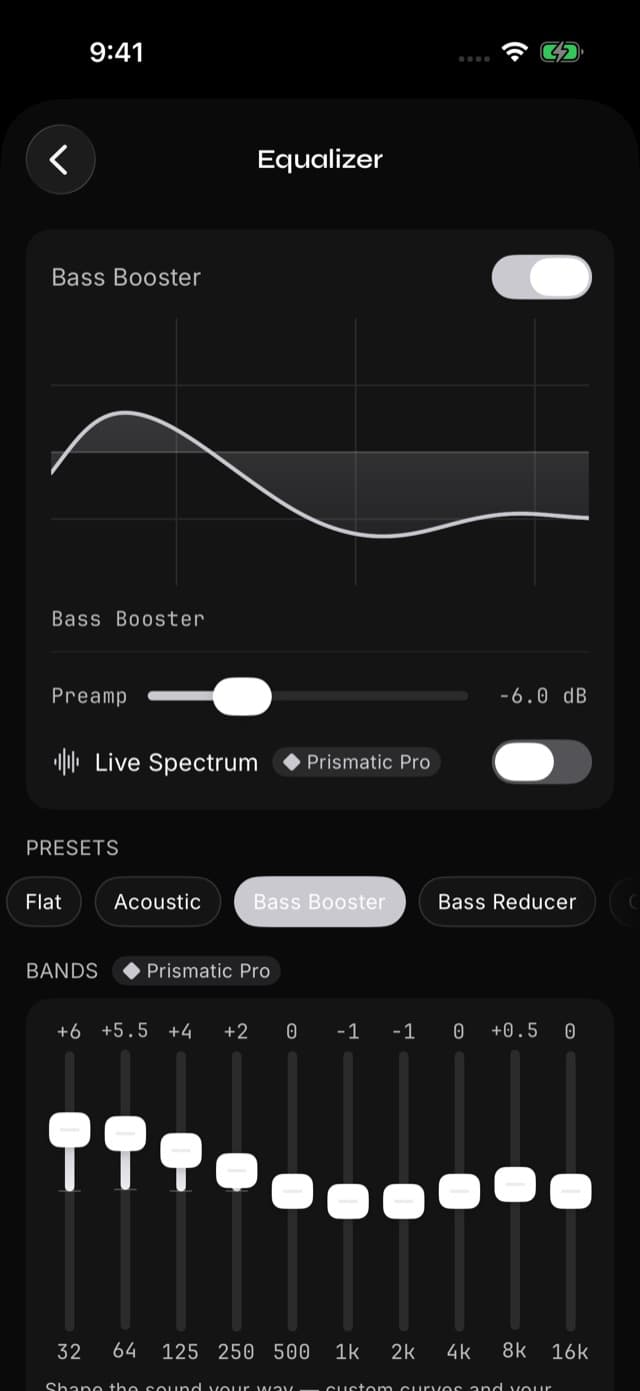
All 22 presets are free. The Prismatic Pro labels shown on this screen apply to custom band tuning and Live Spectrum; you don't need Pro to choose a preset.
Listen to the same part of the song when comparing settings. Some presets lower the overall level to leave room for the boosted frequencies, so a little quieter doesn't mean the preset hasn't worked. Keep your listening volume comfortable and judge the balance of the sound.
Which EQ preset should you choose?
Pick the change you want to hear. These are starting points, and your headphones and music will influence which one you prefer.
| What you want | Try this preset | What it changes |
|---|---|---|
| More weight in drums and bass lines | Bass Booster | Lifts the low end for a fuller sound. |
| Less boom from bass-heavy headphones | Bass Reducer | Turns down low frequencies so they dominate less. |
| Vocals that stand out more | Vocal Booster | Brings forward the middle frequencies where voices carry much of their presence. |
| Speech that's easier to follow | Spoken Word | Reduces deep bass and emphasizes the voice range. |
| Softer cymbals or less sharpness | Treble Reducer | Turns down the high end. |
| A livelier mix of bass and brightness | Rock | Lifts the low and high ends while easing back some of the middle. |
The names aren't rules. Rock might suit a pop album; Vocal Booster might suit an acoustic recording. If none improves the song for you, choose Flat or switch EQ off. Your original music files stay unchanged.
What do the equalizer sliders do?
Think of an equalizer as separate volume controls for different parts of a sound:
- Bass, on the left: the weight of a kick drum, rumble, and bass guitar.
- Mids, in the middle: much of the body of voices, guitars, and piano.
- Treble, on the right: brightness, cymbals, and fine detail.
A preset moves these controls together. With Prismatic Pro, you can adjust them individually and save your own presets. Prismatic has ten bands, from 32 Hz to 16 kHz, with up to 12 dB of adjustment in either direction. Live Spectrum, also part of Pro, shows how the sound is distributed as it plays.
If you try custom tuning, start with a small change to one or two sliders. Lowering something that sounds too strong can be more useful than raising everything else. Our equalizer feature page has the full preset list and controls.
iPhone music apps with an equalizer
Choose an EQ in the app where you actually listen. Prismatic's equalizer shapes music playing inside Prismatic; it doesn't change Spotify or other apps.
| Where you listen | Your EQ option |
|---|---|
| Your own music files in Prismatic Music | 22 free presets, plus custom ten-band tuning and saved presets with Prismatic Pro. |
| Apple's Music app | Choose a preset in iPhone Settings → Apps → Music → EQ. Apple's instructions. |
| Spotify | Spotify has its own equalizer with presets and manual adjustments. Spotify's instructions. |
| Your music in Flacbox | Flacbox offers a ten-band equalizer, presets, and manual controls. The developer's EQ guide. |
If you mainly stream in Apple Music or Spotify, start with that app's controls. For a collection of downloaded albums or ripped CDs, Prismatic brings your library, playlists, and EQ together. Our offline music player comparison covers more ways to manage a personal music collection.
Prismatic plays music files you own. Copy-protected downloads from Apple Music or Spotify subscriptions stay in those services; they can't be imported into a third-party player.
Make your next album sound right
You don't need to spend an evening tuning ten sliders. Import an album, choose a preset, and listen. Bass Booster, Vocal Booster, and Treble Reducer give you three easy places to start—and switching EQ off is always one tap away.
Try Your First EQ Preset
Bring your music to Prismatic Music. Free offline playback and 22 presets, with optional Pro tools when you want more control.
Quick answers
Frequently asked questions
- Does iPhone have a built-in equalizer for music?
- Yes. For Apple's Music app, open iPhone Settings, then Apps, Music, and EQ to choose a preset. That setting is for the Music app. To adjust songs playing in Prismatic Music, use Prismatic's own Equalizer.
- Is Prismatic Music's equalizer free?
- All 22 built-in presets are free, including Bass Booster, Rock, Vocal Booster, and Spoken Word. Prismatic Pro adds custom band adjustments, saved personal presets, and the Live Spectrum display.
- Do EQ presets work with Bluetooth headphones?
- Yes. Prismatic applies EQ before sending sound to your Bluetooth headphones or speaker. You can also use it with wired headphones. Try your preset with the headphones you actually use, because the same setting can sound different on another pair.
- Which EQ preset should I use for spoken word?
- Start with Spoken Word for audiobooks or spoken recordings imported into Prismatic Music. It reduces deep bass and emphasizes the range that helps speech stand out. Compare it with Flat and choose whichever makes the voice easier to follow.